
The paperwork that comes after the work, already done
Mark the job done and the invoice raises itself. Twenty-two rules turn what you were going to do anyway into the records your accountant asks for, shaped around your trade and sitting in the same system as the rest of your life.
16 business types · Unlimited ventures · 22 automations · VAT & P&L · Accountant Pack + raw CSV
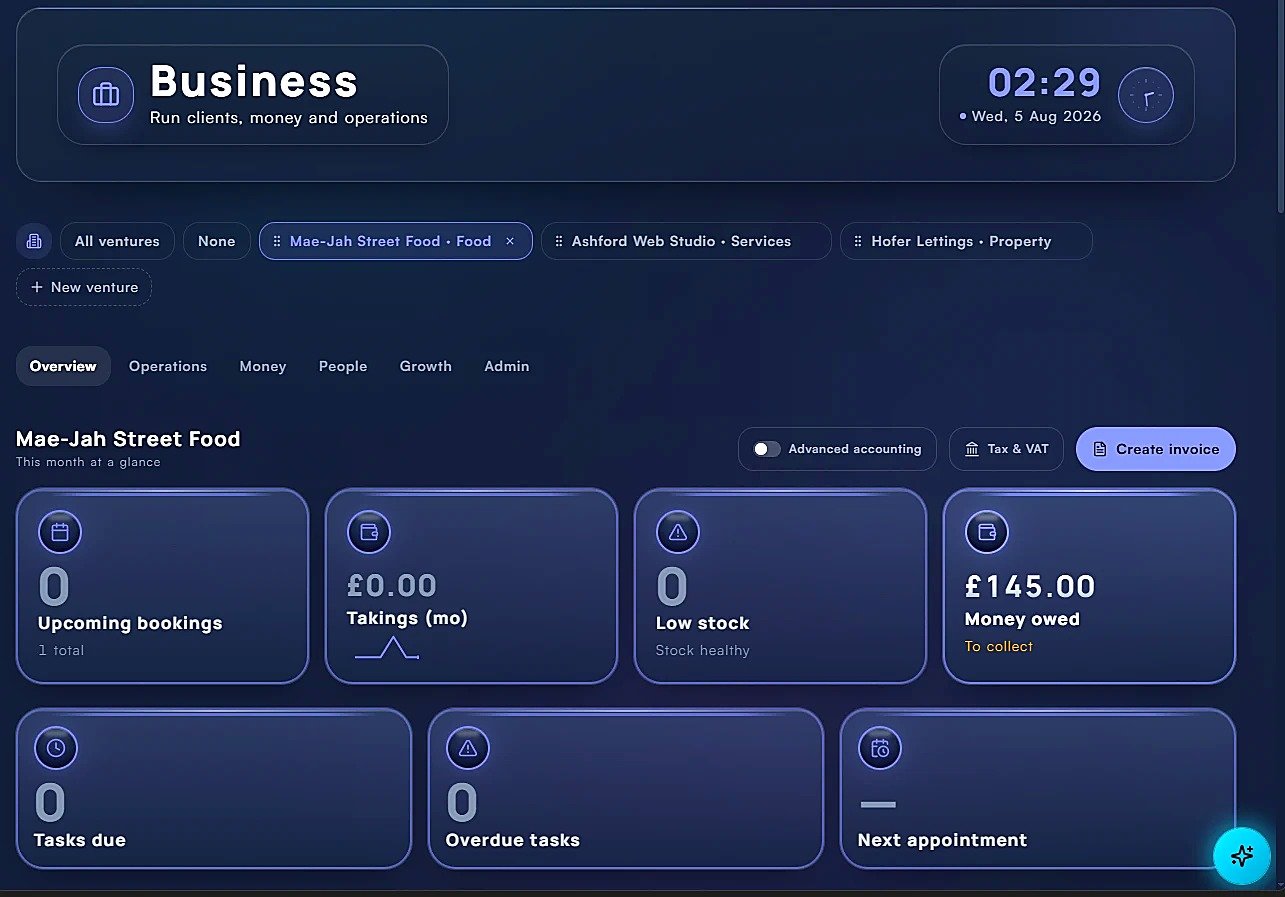
What you get
Run the business, keep the records
Multiple ventures
Manage more than one business, each with its own workspace.
Money in, money out
Income, expenses, invoices and cash-flow you can read at a glance.
Accountant-ready exports
Ledgers, P&L, unpaid invoices and tax-year exports (CSV/PDF).
Tasks, notes & calendar
The same connected system as the rest of your life.
Holvario handles business record-keeping and cash-flow tracking with accountant-ready exports. It isn't full accounting software and doesn't file taxes for you.
Pick your business type
Same system, tabs that fit your trade
Sixteen business types, each with its own tabs, records and numbers, one of them General for anything that doesn’t fit a box. Pick yours to see what it gets and what runs itself.
General business
Plus the set every venture gets: Leads, Banking, Payments, Costs & Bills, Contacts, Campaigns, Print & Marketing, Social Accounts, Domains, Admin & Docs.
More than one
Every business gets its own everything
Run a consultancy, a shop and a rental without them bleeding into each other.
Separate books
Each venture keeps its own clients, invoices, expenses, bank accounts and P&L. Switch between them from the bar at the top.
Its own task list
Tasks belong to the venture you created them in, so the shop's jobs never clutter the consultancy's. Every one still lands on your single shared calendar.
Tabs that fit the trade
A food truck gets takings and pitches; a landlord gets tenancies and repairs; an agency gets quotes and retainers. Sixteen types, each shaped differently.
Unlimited ventures on Premium and Custom. Personal doesn't include the Business hub.
The paperwork does itself
Change a status. The admin follows.
Twenty-eight rules turn the thing you were going to do anyway into the record you'd otherwise have written up later. Twenty-two of them are for the business. Every one can be switched off, and every firing is logged so you can see exactly what was created and why.
- Lead
- Quote sent
- Accepted
- Job
- Done
- Payment
- Accounts
Accepting the quote drafts the invoice. Completing the job logs the payment. You didn't type either.
- Enquiry
- Booking
- Confirmed
- Done
- Payment
Confirming the booking drafts the payment for its fee or deposit. Markets and street pitches are treated as costs, not income.
- Tenancy
- Rent due
- Ticked
- Payment
- Next date rolls
Ticking the rent logs the payment and rolls the next due date forward, so the schedule keeps itself. Gas and electrical certificates raise their own task before they lapse.
- Round
- Visit done
- Payment
- Next visit rolls
One tick per visit. The money is logged and the next visit is already scheduled. The same goes for recurring subscriptions and memberships.
- Order
- Paid
- Stock down
- Income recorded
One status change moves the money and the stock together, so your counts don't drift from your takings.
All twenty-two rules
What happens while you work
All twenty-two, listed. This is the admin you stop doing.
Work done → money owed 12
You mark the thing finished. The invoice raises itself.
- A quote is accepted → pending payment drafted for the amount.
- A job is completed → payment logged at its price.
- A booking is confirmed → payment drafted for the fee or deposit.
- A booking is delivered → payment logged for the fee.
- A catering booking is confirmed or done → payment drafted (market and street pitches are treated as costs, not income).
- A stay is confirmed → payment drafted for the payout.
- A round visit is ticked → payment logged and the next visit rolls forward.
- A rent date is ticked → payment logged and the next rent day rolls.
- A diary appointment is done → payment logged at its price.
- A subscription renewal is ticked → payment logged, next renewal rolls.
- A subscription goes Active → first payment drafted (once).
- Billable time is billed → payment for hours × rate, and the entry is marked invoiced.
Takings & stock 3
For the trades where the money and the goods move together.
- An order is paid → that quantity comes off stock, and you're warned the moment it hits your re-order level.
- A reservation is marked done → its bill total posts to daily takings.
- A class is logged as run → drop-in money (people booked × price) posts to takings.
Costs & clients 3
The quiet ones that keep the books honest.
- A cost marked auto-pay each cycle posts a paid payment for every cycle that has come due and rolls the date, so standing orders and direct debits keep the balance current on their own.
- A cost tagged to a campaign keeps that campaign's spend figure real, instead of a number you remember to type.
- A subscription for someone not on your client list creates them as a client too.
Deadlines that chase you 4
The ones that cost money or break the law if they slip.
- A lead going cold (never contacted, or not for a week) raises a task to chase it.
- Gas safety (CP12) and electrical (EICR) certificates raise a task to book them before they lapse. They're a legal duty for a landlord.
- Equipment service or certificate coming due raises a task to book it.
- Insurance, licences and certificates expiring raise a task to renew, so a lapsed policy can't catch you out.
Six more run across your personal hubs: a home provider's renewal, a provider's cost becoming a bill in Finance, an improvement you finished becoming spend, a repeat prescription, a list with a reminder date, and last season's games tidied away.
At year end
Your accountant shouldn't have to untangle your year
Everything you've recorded through the year is already in the shape they ask for.
The numbers
Income and expenses, invoices and quotes, money owed, VAT tracked on each row, and a profit & loss you can read without a spreadsheet.
The handover
An Accountant Pack (summary, income, expenses and money owed) to print or save as a PDF, plus a CSV of every raw transaction.
If you want it
Switch on advanced accounting for a full double-entry ledger, chart of accounts and journals. Most people never need to.
Holvario organises your accounts. It does not file your tax returns. It keeps the records straight and hands your accountant something they can work from.
Start with the business type you run.
Your business and your life, one system.
7-day free trial · no card · Business hub on Premium and Custom, from £17.99/mo.